Appearance
Menu
Menu is a collection of the named links styled for usage. Each item has the Name to be displayed and the Link to direct to.
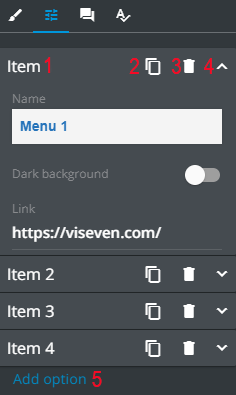
The menu Properties tab allows you to do the following changes with each item in the list separately:
[1] – to edit the menu item name with WYSIWYG.
[2] – to copy the menu item.
[3] – to delete the menu item.
[4] – to unfold the menu item details to edit the name and add the required link.
[5] – to add a new menu item by clicking ADD OPTION.