Appearance
CLM
To export your e-Detailer for CLM, perform the described common steps first.
Once you reach the Export pop-up, you can select the required CLM system from the following list:
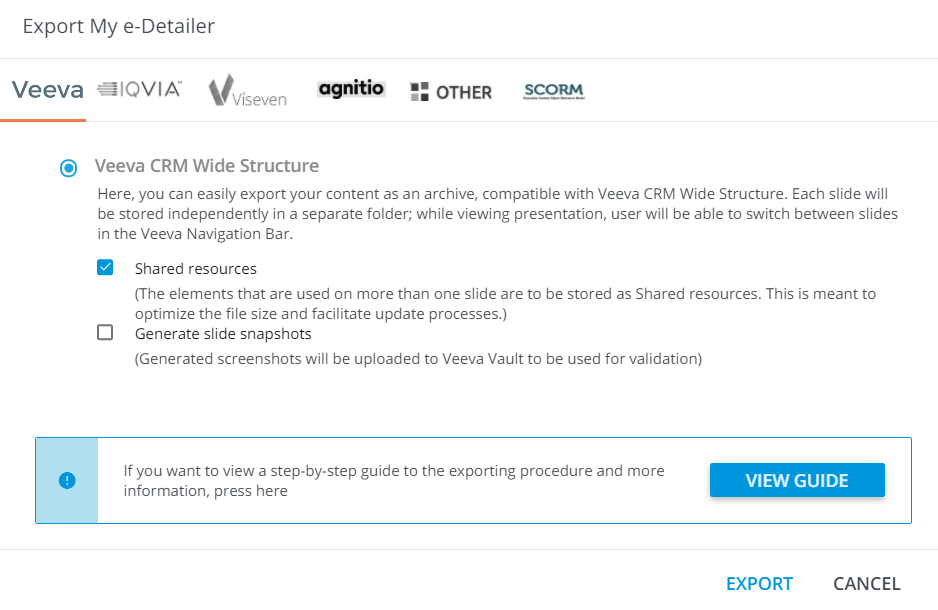
Veeva
Veeva CRM Wide Structure(an archive with each slide in separate folder; you can switch between slides in the Veeva Navigation Bar)Shared resources(optimizes the file size and facilitates updating)Generate slide snapshots(can be used for the validation in Veeva Vault)
IQVIA
IQVIA OCENexxus MI Multi-Sequence(compatible with the Nexxus Mobile Intelligence with the possibility to navigate between slides)Nexxus MI Single-Sequence(compatible with the Nexxus Mobile Intelligence; select this configuration if all presentation's slides are linked to the same product; features the built-in swipe between slides)Nexxus MI Single-Sequence(Enhanced Flow) (covers the Nexxus MI Single-Sequence functionality supplemented by the Generate slide snapshots feature)Generate slide snapshots(can be used for the validation in Veeva Vault)KADRIGE iDetailing(the presentation can further be used for the remote communications)
Viseven
Viseven Single-Page Application
Agnitio
Agnitio iPlanner(a *.zip archive compatible with the Agnitio system)Rainmaker TM Engager(the presentation can be used on mobile devices with Agnitio's Engager for Rainmaker TM)
My Force
SFDC PhoneGap(compatible with Mylan SFDC Phonegap Mobile Client)
Other
TerrasoftTeam Soft Pharma Touch CLMDataMind
SCORM
SCORM(a SCORM-compatible build that can be widely used across eLearning platforms)